
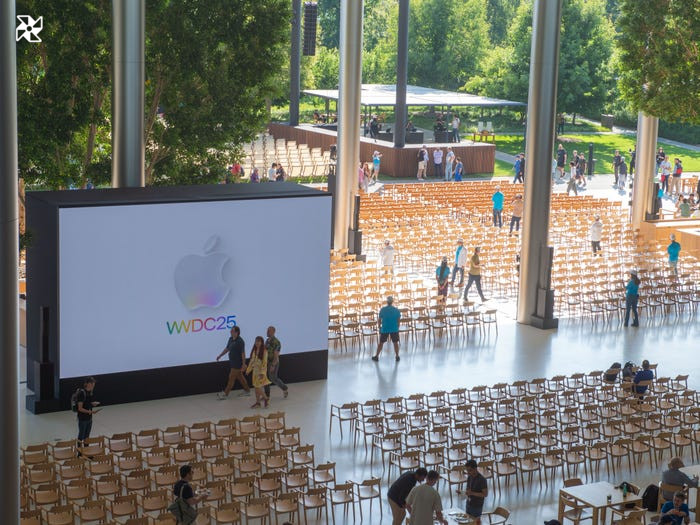
Apple's Worldwide Developers Conference (WWDC25) is underway at its iconic Cupertino campus, welcoming developers, students, and press. Expect major iOS 26 reveals, including a redesigned interface and potential AI advancements, crucial for reassuring investors and fans
WWDC 2025: Apple's iOS 26 & macOS Unveiling – Major Design Overhaul Rumored
Apple's Worldwide Developers Conference (WWDC) 2025 is here, promising a major unveiling of iOS 26 and the next generation macOS. Expect a significant design refresh and rumored major naming changes for iOS. The keynote is a critical opportunity for Apple to showcase its advancements, including potential updates on its AI strategy
Apple WWDC 2025 Keynote: AI, iOS 26, and iPadOS 26 Updates Expected. Wall Street anticipates a critical opportunity for Apple to showcase its AI advancements, following delays with Apple Intelligence. Expect iOS 26 and iPadOS 26 reveals, including major design overhauls and new multitasking features, plus potential surprises
WWDC2025 Keynote: CEO Tim Cook's pre-recorded address (1 PM ET) kicked off Apple's Worldwide Developers Conference, unveiling iOS 26, iPadOS 26, and potential AI advancements. Follow for live updates on the latest Apple software innovations
iPadOS 26: Mac-like Features Arrive! Personalize your Files app folders and experience enhanced organization with a new windowing system, redesigned app icons, and widgets. Plus, enjoy the new Local Capture feature for seamless audio and content sharing. This is the iPadOS update you've been waiting for!
iPadOS 26 introduces Local Capture: easily record and share audio and content directly from your iPad
Apple calls iPadOS 26 the iPad update we've all been waiting for, boasting a redesigned interface with new app icons, widgets, and a revolutionary windowing system for enhanced multitasking. This major iOS overhaul brings Mac-like features to the iPad, including customizable Files app folders and a new Local Capture feature
iPadOS 26: Redesigned App Icons and Widgets Enhance the iPad Experience. Apple's WWDC 2025 reveals a refreshed visual aesthetic, continuing its software overhaul with updated app icons and widgets for a more intuitive iPad experience
iPadOS 26: Enhanced Multitasking with a Revolutionary New Windowing System. Apple pushes capabilities further with improved app organization and tiling features for a more efficient workflow
Organize open apps effortlessly with iPadOS 26's new tiling window management system. Enjoy a cleaner, more efficient workspace by arranging app windows for improved productivity
WWDC 2025: iPadOS 26's new windowing system, showcased in a pre-recorded demo, offers seamless touch and trackpad support, enhancing multitasking and productivity on iPad
iPadOS 26's design boasts a refined, Mac-like aesthetic, offering a familiar yet enhanced user experience
Apple Vision Pro's personalized avatars, or Personas, are getting a major visual overhaul. Expect a striking redesign of your virtual representation in the upcoming update
Apple Vision Pro's avatar gets a major upgrade! Enhanced realism with improved hair, lashes, and complexion delivers a more natural-looking personal representation
Apple WWDC 2025: VisionPro receives major update; iOS 26 and iPadOS 26 boast redesigned interfaces and enhanced multitasking
Apple says VisionOS 26 is “packed” with new experiences and features. That means new “spatial” content as well.
In VisionOS 26, users can place widgets around their virtual space, and they’ll remain where they left them thanks to the new Widgets app. The content will show up as you left it whenever you power up your Vision Pro.
In other words, that clock on the wall will still be there when you put your headset on.
We’re seeing a pre-recorded demo of using Spotlight on Macs to accomplish some tasks, along with Shortcuts.
We’re seeing “quick keys” being used. Typing “sm” and “ar” into Spotlight search, for example, will pull up prompts to send a message or set a reminder.
Spotlight will also have search history to pull from your previous searches. You can run your shortcuts through Spotlight and use quick keys to pull them up.
Apple says Mac shortcuts are getting smarter, thanks to AI. It’s calling it “Intelligent actions.”
Users can incorporate AI to get a more personalized experience from different apps and have more complex shortcuts.
“Every day, they combine multiple steps from your favorite apps to create powerful personal automation,” Apple says.
Apple isn’t sticking to the naming convention of its other software systems for Mac, instead naming it “Tahoe.”
It is, however, getting the “Liquie Glass” treatment.
There’s now the ability to change the color of folders on your Mac.
“You can go with that sleek, clear look, or dial up” the dark aesthetic, Federighi says.
Live Activity updates, such as Uber Eats delivery ETAs in the Dynamic Island on the iPhone, are now coming to Macs too.
With tvOS 26, Apple says the layout is getting more cinematic, with tools that are less distracting and new poster formats.
It also gave a sneak peek of originals coming to Apple TV+, with star-studded offerings, and updates to the karaoke experience on Apple TV with the Apple Music Sing feature, which turns your iPhone into a karaoke microphone.
“Your iPhone becomes the mic, amplifying your voice through TV visual effects that light up when you’re with friends,” Apple says.
Other new features include Workout Buddy, which tracks your exercise history and encourages you using a text-to-speech AI fitness coach.
WatchOS 26 users will have a more personalized recap of their workouts and fitness milestones.
Apple says it’s also improving its “Smart Stack” feature, which surfaces apps or items it thinks you are likely to find useful at a given time.
A new Watch gesture, “wrist flick,” will make navigating notifications as simple as a flick of the wrist.
“You can also use wrist flick to mute incoming calls, silence timers and alarms, or even close the smart stack,” Apple says.
Now for Visual Intelligence, Apple’s AI feature that can detect what’s on your screen or in front of your phone’s camera.
Using the AI program, anything you’re viewing on an app can be searched using Visual Intelligence. All you have to do is take a screenshot and select the search option for results.
Users can tap a part of a screenshot to search a specific product that shows up in the photo. The same process exists for events. Visual Intelligence can view and create an event based on details in a screenshot. You can also ask ChatGPT for information based on your screen.
Apple overhauls its gaming experience with a new app, which the company says is an “all-in-one destination for games and playing with friends.” The app will feature “Challenges,” or new ways to compete with friends in various apps.
There will also be Apple Arcade integration, Apple’s subscription gaming offering.
At the airport, in stores, or online shopping, Apple says Wallet is getting more features to make travel and shopping more convenient.
In nine participating states, you’ll be able to store your ID.
“Digital ID can be used for domestic travel at supported TSA checkpoints, in apps and in person where age and identity verification are required,” Apple says.
Heads up, commuters.
“Your iPhone will adapt to it, and with the Maps widget, you can check your commute. If there’s significant delays, maps will send you a notification with alternate route options, even if you didn’t start directions,” Apple says.
Users will see translations of their music lyrics, and they can pin their music favorites to make them easily accessible.
This looks pretty useful. In messages and calls, you can get a live translation of yourself or recipients, even if they aren’t iPhone users.
For example, a FaceTime sent in one language would be translated in real time.
In iOS 26, you can set your own background for group message threads using Apple’s Image Playground. In your group chat, you can create polls, use Apple Cash, and see when your friends are typing.
There’s also the Unknown Senders feature in Messages, in which unknown senders appear in a dedicated area where you can decide if you want to mark the number as known, ask for more information, or delete.
Unknown senders will be filtered out of your message threads to avoid a cluttered text list.
The Phone app is getting more seamless — and by the looks of it, more private.
In the overhauled app, voicemails, recents, and favorites are combined.
A new Call Screening feature will allow Apple to silently answer unknown calls and give you info to know if it’s worth answering.
In another change, if you’re put on hold during a customer service call — the feature can detect hold music — Hold Assist can keep your spot in line until someone actually is ready to help you.
CarPlay is getting more like an iPhone.
Users can access widgets and their friends’ flights, for example, via their dashboard.
It’s “all done in a way to help you stay focused on the road,” Apple says.
The most used capture features, video and photo, will be easily accessible. The company will also update its Photos app to make finding your media faster.
Apple is unifying its software naming across iPhone, Apple Watch, and iPad to match. So, going forward, it will be tied to the year.
This year’s iOS version, for example, will be “iOS 26.”
The “Liquid Glass” design language in iOS 26 starts off with the home screen and refreshes the look of apps while maintaining that familiar Apple feel, the company says.
Apple announces its “broadest design update ever” — “Liquid Glass,” its new design language across all of its software.
The new is inspired by the look and feel of the Vision Pro, Apple says.
Here we go..
No new features yet, just a recap of what’s already launched.
Federighi says some of the Apple Intelligence features “needed more time to reach our high-quality bar” and more will be launched in the coming year.
However, Federighi says there are more Apple Intelligence features that will be announced today.
Cook, speaking from inside Apple’s headquarters, teases a slate of announcements.
We’re starting with an F1-focused skit — Tim Cook is in it, as is Apple exec Craig Federighi.
Apple’s “F1” movie debuts later this year.
Curious where the audience will be? Photos from earlier this morning show inside Apple Park, where people will watch the pre-recorded keynote together before breaking off into various developer sessions.
At WWDC 2024, Apple demoed a more conversational, personalized Siri that could take on more complex requests. The virtual assistant is still working on its communication skills after its overhaul was delayed to 2026.
“I asked Siri if there’s an Apple event today… she has no idea,” tech reviewer Marques Brownlee said in an X post.
Some users joined in to show how their Siri answered the question, and others compared it to rival chatbots. The assistant directed some to Apple’s official website with event information.
One user said Google’s Gemini said yes and provided a brief summary of what the event is.
“Gemini knows there is an Apple event today. How embarrassing,” the user wrote.
Gemini knows there is an Apple event today. How embarrassing 😅 pic.twitter.com/ovse5SDqyx
Apple Intelligence made a big splash at WWDC 2024. Since then, it’s had a challenging rollout with delays along the way. Analysts want answers on AI and what’s next, but they aren’t sure Apple will make any big announcements on that front.
“The WWDC announcements will be relatively incremental and muted, perhaps except for a likely visual design overhaul of the user experience,” Forrester analyst Dipanjan Chatterjee told Business Insider on Friday.
Any updates on its AI strategy will be a topic of interest as it “ultimately unlocks the developer ecosystem, which remains the hearts and lungs of the Apple story,” Wedbush Securities analyst Dan Ives wrote in a note.
It’s a “critical opportunity” to put analysts’ minds at ease when it comes to tariffs, AI, and hardware plans, said Gadjo Sevilla, analyst at EMARKETER, a sister company to BI.
WWDC attendees got a swag bag of rainbow-colored pins, a water bottle with pink accents, and more, according to one app developer’s social-media post.
One collectible pin features an octopus hovering over a keyboard.
See you soon #WWDC25! pic.twitter.com/xna3JqcGvp
Cook posted his signature sunrise picture over the Apple campus to let followers know he’s up and ready for WWDC.
“See you soon,” Cook captioned the X post.
Apple’s keynote, featuring Cook and other Apple leaders, will stream live on YouTube and on its website starting at 1 p.m. ET.
Apple usually teases some of the announcements from WWDC with a themed announcement. For this year’s conference, guests were invited to take a “sleek peek.”
A play on “sneak peek,” reports have indicated Apple is going to show off a sleeker iOS software design that has been called “Liquid Glass.”
Source: Original Article